Hey fellow creators! So, as some folks may have recently become aware, Tumblr posts with external links don’t show up in relevant tags (as detailed in this post). IE, if you post a Steven Universe picture and tag it “Steven Universe” and there’s an external link in the post, it won’t actually show up in the “Steven Universe” tag! This is very frustrating! What if I make a post and want to link to my Twitter in the description? What if I want to link people to my online store when I post a piece of art? What if I want to link to a YouTube video and still have it show up under the relevant tags I put into the post?
Hold on to your butts kids cuz here’s how we cheat the system.
—
The thing about Tumblr’s Anti-Linking nonsense works is that it only blocks external links. Internal links are fine. So if you wanted to post a link to another Tumblr post, or someone’s Tumblr blog, you’re good. But if you wanted to link to your Twitter page or something, you’re screwed. So, all we gotta do is make your external link into a Tumblr link. Sounds weird. I know. But here’s how it works.
First, go to your Tumblr blog. Hit the “Edit Theme” tab.
In the theme editor sidebar, scroll all the way to the bottom, the “Page” section. (Here’s what mine looks like- I already have a few of these set up)
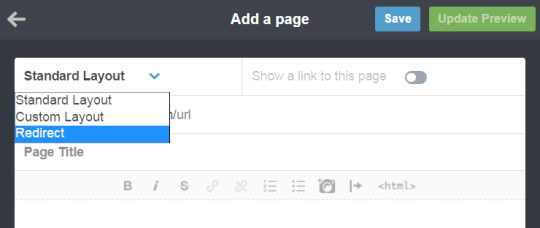
Hit “Add a Page”, and this window will pop up. By default it’s set to be a Standard Page. Hit the dropdown and select “redirect”.
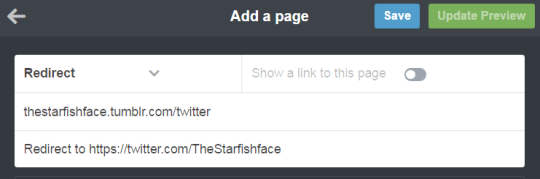
For this example, let’s say I want to link to my Twitter page. I’ll name the page “Twitter” (this is what the redirect URL will end up being- IE yourblogname.tumblr.com/Twitter), and insert my Twitter URL under the “Redirect To” tab. Leave “Show a link to this page” turned off. (Unless you want the link to show up on your blog, in which case, turn it on. Do what you want, I’m not your mom)
Hit “Save”, and your new page should now show up on your Page list!
And done! So now, let’s say I wanted to use the new link in the text portion of a post. Simply use the Tumblr redirect link instead of the direct URL! As a test, I linked to my Twitter in a test post, using the redirect link instead of the direct link, and there it is in the tag! Success!
I recommend making a Redirect Page for any external links you’ll be using frequently. I like to post links to my webcomic/Twitter in posts fairly often, but doing that made me take a pretty big hit since my posts wouldn’t show up in tags. With this method, I can keep the external links, and have stuff show up when I tag it! Workarounds are fun!
Ancient moon priestesses were called virgins. ‘Virgin’ meant not married, not belonging to a man – a woman who was ‘one-in-herself’. The very word derives from a Latin root meaning strength, force, skill; and was later applied to men: virle. Ishtar, Diana, Astarte, Isis were all all called virgin, which did not refer to sexual chastity, but sexual independence. And all great culture heroes of the past, mythic or historic, were said to be born of virgin mothers: Marduk, Gilgamesh, Buddha, Osiris, Dionysus, Genghis Khan, Jesus – they were all affirmed as sons of the Great Mother, of the Original One, their worldly power deriving from her. When the Hebrews used the word, and in the original Aramaic, it meant ‘maiden’ or ‘young woman’, with no connotations to sexual chastity. But later Christian translators could not conceive of the ‘Virgin Mary’ as a woman of independent sexuality, needless to say; they distorted the meaning into sexually pure, chaste, never touched. —Monica Sjoo
Casual reminder that “virgin” in the modern/Christian sense of the word is literally a complete bullshit, made-up social construct, arbitrarily given a negative connotation.
@deadcatwithaflamethrower this seems like it should be up your alley what with the historical myths and the way words change
I was right there with @arkhamarchitecture. I was sitting here trying to figure out what region of the state the cannibals were hanging out in, because really, there are a LOT of options.








 Asknotbug's Tumblr Backup